Fonts and Frustration

TL;DR – There are a couple of XML files at the end of this post. If you regularly present technical material using SSMS, download these.

I present technical sessions now and then – my local PASS group, SQL Saturdays, internal groups at my workplace, etc. I frequently find myself adjusting the fonts inside SQL Server Management Studio to make sure my material is readable on the big screen. I’ve also been in the audience plenty of times, watching with sympathy as one of my cohorts agonizingly navigates this problem.

Usually, it goes something like this. They first find the [100%] tucked away in the lower left corner of the text window, and blow that up to 150 or 200 percent. Then they run their query to find that the results are still at 100%. So then they eventually find the Options dialog under the Tools menu, find the Fonts and Colors branch of the tree, and then groan when they realize they have to figure out which three or four of the 30 different fonts they need to change. Sometimes, they’ll give up there and just go use ZoomIt (which any good technical presenter should have available anyway), but constantly bouncing around with ZoomIt will get old quickly over the course of an hour-long session.

But if they do manage to find the right fonts to change and take a good stab at what they ought to be, they get this wonderful message:

Font Frustration

Just the thing you want to see when you already have all your demo scripts loaded, right?

Oh, and don’t forget that – when the session is over – you now have to go through the same exercise to get SSMS back where you had it before the session.

So quite a while ago, I generated a couple of .reg files for myself, one called PresentationFonts.reg and one called NormalFonts.reg. You can imagine what these did when I applied them to the Windows Registry.

That worked great… until recently. The SQL Server Tools team has done some marvelous things with SSMS lately, and I’m very happy with the changes. But take a close look at one of those things they did:
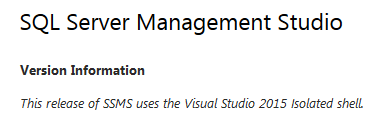
Version Information

And where does this new shell keep its settings? Here’s a hint – it’s not in the registry. It’s actually in this file:


{LocalApplicationDataPath}\Microsoft\SQL Server Management Studio\13.0\ApplicationPrivateSettings

And this file is some bizarre hybrid of XML, JSON (with JSON inside of JSON, no less!), and I don’t know what else.

Fortunately, there is an option available. Under the Tools menu, there is “Import and Export Settings…”, which gives you a wizard for importing some or all settings from an XML file. So, with that in mind, here are my files that I use.

  • PresentationFonts.vssettings – This changes the font size to 16 for Text Editor, Execution Plan, Grid Results and Text Results.
  • NormalFonts.vssettings – This changes the font size to 9 for Text Editor, Execution Plan, Grid Results and Text Results.

NOTE: When you save these, save them with the .vssettings extension. Since I’m a cheapskate and use wordpress.com to host this blog, I’m prevented from using whatever extension I want. So they’ll show up as .doc files in your download dialog, but they really are just text XML. And the Import/Export wizard looks specifically for .vssettings files.

Obviously, you may not use the same settings I do, and you’ll have to customize them for your own uses. If you change the same four that I do, then all you have to do is fiddle with the sizes in the files. If you wish to change different fonts, you’ll want to export your settings with that wizard, change the font you want, export them again, and compare the files in order to figure out which GUID is which.

In any case, I strongly recommend having a pair of files like these parked right next to your demo scripts, where you’ll remember to run them as you prepare for your session.

I know this is a rather long post for a rather small tip, but I’m amazed at just how many of us fight this problem. If I had a dollar for every time I’ve seen a presenter struggle with font sizes, my Azure subscription would be paid for.

NULL Pain Revisited

In an earlier post, I covered an issue with special characters in Transact-SQL. I ended up creating a scalar function to handle it. Well, fast-forward a few months and now my query’s inability to go parallel is really starting to cause trouble. And, yes, scalar functions are absolutely poisonous to parallelism.

Anyway, I revisited the idea of stripping the null characters inline, rather than calling a function, and somewhere out there on the intarwebs I found this gem:


SELECT @var = REPLACE(@var COLLATE Latin1_General_BIN, NCHAR(0x00) COLLATE Latin1_General_BIN, NCHAR(9));

In my case, I’m replacing all instances with a tab character.

But I can’t find or remember where I got it! So, my sincere apologies to the real source, whoever you are. But even if I can’t claim ownership or identify the source, I still want to make sure this one’s out there for everyone else’s benefit.

Godspeed!

Compile Time Part 2

TL;DR – Square brackets do not save the optimizer any time.

If you didn’t already read Part 1, you might want to go back and do that.

I will easily admit that I can be rather obsessive about code formatting sometimes. Frankly, inconsistency annoys me. When it comes to Transact-SQL, this can translate into all sorts of little quirks in my code. One of the latest ones is overuse of [square brackets].

They have their place, of course. There’s a reason the QUOTENAME function exists. And there will always be some annoying fool that likes to create columns with names like “name” and “type” or – worse – put actual SPACES in them!

But I’ll admit it – I’ve been getting carried away. I blame Postgres, which won’t let me use Pascal casing without throwing quotes around every identifier. But I digress…

Anyway, this obsession had me thinking – does wrapping identifiers in square brackets save SQL Server any time? Does it say to the optimizer, “Hey, I PROMISE this whole thing inside these square brackets is an identifier. Cross my heart.” And the optimizer takes your code at its word and doesn’t look through its list of reserved keywords for one that matches AccountCreateDate or address_line_2?

The answer is… no. Throwing every identifier into square brackets doesn’t speed it up at all. Here’s the test:


IF EXISTS (SELECT 1 FROM sys.procedures WHERE object_id = OBJECT_ID('dbo.j1'))
DROP PROCEDURE dbo.j1;
GO
CREATE PROCEDURE dbo.j1
AS
EXEC(N'DECLARE @rowguid UNIQUEIDENTIFIER; SELECT @rowguid = rowguid FROM Person.Address WHERE AddressID = 1 OPTION (RECOMPILE);');
GO

IF EXISTS (SELECT 1 FROM sys.procedures WHERE object_id = OBJECT_ID('dbo.j2'))
DROP PROCEDURE dbo.j2;
GO

CREATE PROCEDURE dbo.j2
AS
EXEC(N'DECLARE @rowguid UNIQUEIDENTIFIER; SELECT @rowguid = [rowguid] FROM [Person].[Address] WHERE [AddressID] = 1 OPTION (RECOMPILE);');
GO

DBCC FREEPROCCACHE;
GO

DECLARE @i INT = 1;
WHILE (@i <= 100000)
BEGIN
EXEC dbo.j1
EXEC dbo.j2
SELECT @i = @i + 1;
END;
SELECT OBJECT_NAME(object_id) AS 'procedure_name', total_worker_time / 1000 AS 'cpu_in_ms'
FROM sys.dm_exec_procedure_stats
WHERE object_id IN (OBJECT_ID('dbo.j1'), OBJECT_ID('dbo.j2'))
ORDER BY OBJECT_NAME(object_id);
GO

Note that this was written to use AdventureWorks2014. Also note that I’m running ad hoc SQL inside of a pair of stored procedures so that I can measure a very quick and small bit of SQL over a lot of executions, forcing it to recompile every time yet keeping the plan cache from blowing up. See Part 1 if you don’t believe that my ad hoc SQL’s compile time is factored into total_worker_time.

Anyway, this code takes about a minute and a half to run on my system. The results? A dead heat. Sometimes, j1 wins, and sometimes, j2 wins. There’s no significant difference.

Compile Time Part 1

TL;DR – The sys.dm_exec_{query|procedure}_stats.*_worker_time fields do not include compile time. But the values in sys.dm_exec_procedure_stats.*_worker_time DO include compile time for ad hoc SQL within the procedures. Also, as a side note, a lot of indexed views can be a significant performance problem.

I recommend a blog post by Jonathan Kehayias entitled, “Identifying High Compile Time Statements from the Plan Cache“. In that, he’s concentrating on queries that have a high individual compile cost.

However, the object of my search was small queries being compiled and executed in high volume (more on why in Part 2 of this). In my case, I was looking for ad hoc SQL being generated and executed inside of stored procedures – the kind of queries that don’t make their way to the plan cache, often due to the use of OPTION (RECOMPILE) to keep them from spamming the cache.

What I found was that worker time needed to compile these queries is indistinguishable from that needed to execute them. To show this, let’s look at an example in AdventureWorks2014. In this example, I’m going to create and execute two similar procedures. I’m also going to create a number of indexed views.

Why indexed views? I want to increase compile time significantly for this exercise, and a large number of indexed views can do that. From MSDN: “The query optimizer may use indexed views to speed up the query execution. The view does not have to be referenced in the query for the optimizer to consider that view for a substitution.” My thanks to oas_public on stackoverflow.com for that tip.

Anyway, let’s create a stored procedure that will use our indexed view:


CREATE PROCEDURE dbo.j1
AS
BEGIN
DECLARE @stmt NVARCHAR(4000);
SELECT @stmt = N'/* dbo.j1 */
SELECT TOP 1
SUM(UnitPrice * OrderQty * (1.00 - UnitPriceDiscount)) AS Rev,
OrderDate,
ProductID
FROM Sales.SalesOrderDetail AS od
INNER JOIN Sales.SalesOrderHeader AS o
ON od.SalesOrderID = o.SalesOrderID
AND ProductID BETWEEN 700 and 800
AND OrderDate >= CONVERT(datetime,''05/01/2002'',101)
GROUP BY OrderDate, ProductID
ORDER BY Rev DESC;';
EXEC(@stmt);
END; --PROCEDURE
GO

By the way, this evolved from sample code on MSDN. Now here’s a second stored procedure that is ever-so-slightly different:


CREATE PROCEDURE dbo.j1
AS
BEGIN
DECLARE @stmt NVARCHAR(4000);
SELECT @stmt = N'/* dbo.j2 */
SELECT TOP 1
SUM(UnitPrice * OrderQty * (2.00 - UnitPriceDiscount)) AS Rev,
OrderDate,
ProductID
FROM Sales.SalesOrderDetail AS od
INNER JOIN Sales.SalesOrderHeader AS o
ON od.SalesOrderID = o.SalesOrderID
AND ProductID BETWEEN 700 and 800
AND OrderDate >= CONVERT(datetime,''05/01/2002'',101)
GROUP BY OrderDate, ProductID
ORDER BY Rev DESC;';
EXEC(@stmt);
END; --PROCEDURE
GO

To make this a fair test, let’s clear the cache:


DBCC FREEPROCCACHE;
GO

And execute both of the procedures:


EXEC dbo.j1;
EXEC dbo.j2;

How long did they take?


SELECT OBJECT_NAME(object_id) AS 'procedure_name', total_worker_time / 1000 AS 'cpu_in_ms'
FROM sys.dm_exec_procedure_stats
WHERE object_id IN (OBJECT_ID('dbo.j1'), OBJECT_ID('dbo.j2'))
ORDER BY OBJECT_NAME(object_id);

On my local system, both run in about 85-105 ms. Obviously, YMMV.

Now let’s create an indexed view. I’m going to reuse this code a couple of times, so bear that in mind when you see how it’s constructed:


--Set the options to support indexed views.
SET NUMERIC_ROUNDABORT OFF;
SET ANSI_PADDING, ANSI_WARNINGS, CONCAT_NULL_YIELDS_NULL, ARITHABORT, QUOTED_IDENTIFIER, ANSI_NULLS ON;
GO

DECLARE @i INT = 1, @stmt NVARCHAR(4000), @t1 NVARCHAR(4000), @t2 NVARCHAR(4000), @t3 NVARCHAR(4000)

-- Create template for dropping the view.
SELECT @t1 = N'/* jtest */
IF OBJECT_ID(''Sales.vOrders_{1}'') IS NOT NULL
DROP VIEW Sales.vOrders_{1};';

-- Create template for creating the view.
SELECT @t2 = N'/* jtest */
CREATE VIEW Sales.vOrders_{1} WITH SCHEMABINDING
AS
SELECT
SUM(UnitPrice*OrderQty*(1.00-UnitPriceDiscount)) AS Revenue,
OrderDate,
ProductID,
COUNT_BIG(*) AS COUNT
FROM Sales.SalesOrderDetail AS od
INNER JOIN Sales.SalesOrderHeader AS o
ON od.SalesOrderID = o.SalesOrderID
GROUP BY OrderDate, ProductID;';

-- Create template for creating the index.
SELECT @t3 = N'/* jtest */
CREATE UNIQUE CLUSTERED INDEX IDX_V1_{1}
ON Sales.vOrders_{1} (OrderDate, ProductID);';

-- Drop and create the objects.
WHILE (@i <= 1)
BEGIN
SELECT @stmt = REPLACE(@t1, N'{1}', CAST(@i AS NVARCHAR(4000)));
EXEC (@stmt);
SELECT @stmt = REPLACE(@t2, N'{1}', CAST(@i AS NVARCHAR(4000)));
EXEC (@stmt);
SELECT @stmt = REPLACE(@t3, N'{1}', CAST(@i AS NVARCHAR(4000)));
EXEC (@stmt);
SELECT @i = @i + 1;
END; --WHILE
GO

Note that the indexed view supports dbo.j1, but not dbo.j2. Let’s go back and run those again:


DBCC FREEPROCCACHE;
GO

EXEC dbo.j1;
EXEC dbo.j2;

SELECT OBJECT_NAME(object_id) AS 'procedure_name', total_worker_time / 1000 AS 'cpu_in_ms'
FROM sys.dm_exec_procedure_stats
WHERE object_id IN (OBJECT_ID('dbo.j1'), OBJECT_ID('dbo.j2'))
ORDER BY OBJECT_NAME(object_id);
GO

If your results are like mine, you’ll see that dbo.j1 has dropped to about a quarter of its previous worker time, but dbo.j2 hasn’t budged. So, our indexed view is doing what we want. Now let’s create a few more. How does 500 sound? In that WHILE loop for the indexed view script, change the constant from 1 to 500 and run it again. Bear in mind, this took about 90 seconds on my system, so be prepared to wait.

Once all 500 indexed views are created, execute the two stored procedures again and look at the results. Both worker time values will be much higher!

But the actual execution time hasn’t changed. We’re still going to get essentially the same plan for each query, which means SQL Server should be doing the same work to execute it. But now the compilation is much more costly because the optimizer is looking at all 500 views when generating the plan. And because that compilation is taking place inside of ad hoc SQL in a stored procedure, SQL Server is reporting it as part of the procedure’s worker time in sys.dm_exec_procedure_stats.

To verify this, you can run Jonathan’s code, which will break out the compile time for those ad hoc queries.

If you’ve been following along in your own database and want to gracefully clean up the mess, you’ll want to do two things. First, execute this:


DROP PROCEDURE dbo.j1;
DROP PROCEDURE dbo.j2;
GO

And second, go back to the indexed view script, comment or remove the last two EXEC lines, and run it again.

In conclusion, the *_worker_time fields in sys.dm_exec_query_stats and sys.dm_exec_procedure_stats do NOT include compile time. That was why Jonathan had to dig into the cached plan and tease that information out of the XML. But the compile time of ad hoc statements inside of a stored procedure WILL be included in the procedure’s execution time.

And too many indexed views can suck.

Stay tuned for Part 2, which explains why I chased this down in the first place.

IndyPASS is going Back to School

Yes, I’ve been quiet on this blog forever. That’ll change soon. I’ve been working on a couple of topics that I think may be of use to people other than me.

But in the meantime, I’m presenting “Back to School: Query and Execution Plan Fundamentals” tomorrow night at the monthly IndyPASS meeting. Think of it like a SQL 101 for developers. Come join us for some free pizza and a little bit of learning.

NULL Pain

I had an issue today that resulted in a tweet to #sqlhelp:

#sqlhelp See Remarks section: http://ow.ly/Za6HX So how do you strip out 0x000? Suggestions?

As it turns out, when you have a character string in SQL Server that contains character 0x000, it really doesn’t know what to do with it most of the time, especially when you’re dealing with Unicode strings.

I did track down http://sqlsolace.blogspot.com/2014/07/function-dbostripunwantedcharacters.html, but I generally try to avoid calling UDF’s in my queries.

I ended up settling on this, which is based on the fact that REPLACE() works when the data is ASCII

CASE WHEN LEN(REPLACE(CAST([foo] AS VARCHAR(4000)), CHAR(0), '')) = LEN([foo]) THEN [foo] ELSE [dbo].[strip_char0]([foo], NCHAR(9)) END

My strip_char0 function was mostly like the one from sqlsolace, so I won’t repeat it here. But I did add in a replacement character option (in this example, a tab). And I’m only calling the UDF when I need to, which makes the performance geek in me happy.

My thanks to @SQLSoldier for being responsive on the #sqlhelp hashtag.

Albuquerque Redux

In just a few weeks, I’ll be back in Albuquerque for their SQL Saturday. My session this time is Adding Lightness, and is a thorough examination of how compression works in SQL Server.

If you’re in the Albuquerque area and work with SQL Server on a regular basis, yet have never attended a SQL Saturday, well… GO! It’s excellent training, virtually free, and a great opportunity to network with your peers. Last year’s event in Albuquerque was outstanding, and I’m looking forward to going back.

Since I’m once again presenting just after lunch, I though I’d do something a little different this time. If you’re a developer or DBA who spends a lot of time addressing performance issues in Transact-SQL, feel free to join me for lunch prior to my session. We’ll make it an informal open discussion on queries and performance. Feel free to bring your war stories, current headaches, and burning questions.

It Does Not Depend

A common refrain in the SQL Server community is the phrase, “It depends.” And, truthfully, that’s the correct answer to many questions. There are so many variables in any given situation that what works great 99 times will not work on the 100th, due to some slight difference.

But here’s one piece of advice that – even if it’s not perfectly 100% – has a high enough success rate that I would say “It does not depend.”


EXECUTE sp_configure 'Show Advanced Options', 1;
RECONFIGURE;
EXECUTE sp_configure 'Optimize for Ad hoc Workloads', 1;
RECONFIGURE;
GO

I have yet to come across a situation in which this shouldn’t be enabled. And I’ve heard others say the same.

By the way, in case you have the same question as an attendee at my SQL Saturday session today in Salt Lake City, no, it will not wipe the plan cache when you turn it on.

Yay #SqlFamily

It’s a big #SqlFamily week for me. Tonight, IndyPASS is having my co-worker, Eddie Wuerch, present on SQL Server v.Next. It’s the first IndyPASS meeting I’ve been able to attend in a while, and I’m looking forward to it.

And then I’m leaving for Salt Lake City this weekend – my first trip to Utah! – where I’ll be presenting a pair of sessions for their SQL Saturday. Both are a result of the great feedback from the #SqlFamily on past sessions I’ve done. Adding Lightness expands on a segment of a previous session that was very well received, and Ad Hoc Rally takes a slightly more focused approach to material that I’ve also covered before.

So, if you’re in Indy, come join us tonight. The pizza’s free and the material should be excellent. Eddie is a great presenter, and I’m sure he has plenty of good info to share.

And if you’re in the SLC area, this Saturday is your chance to get some outstanding database training. In addition to the 24 scheduled PASS sessions, it’s also the Intermountain Big Data Conference, so there should be plenty to learn.

Godspeed!

SELECT TOP 1 * FROM PASS.Summit2015;

I’ve been uncharacteristically quiet during this particular Summit. I picked up a cold on the way out there, which made the week a bit different than I was expecting. Still, I always take away quite a lot each time I go, both big and small, and this year was no exception. I’d like to share one of the small things here.

At some point, we’re all running ad hoc queries in a production or otherwise significant environment. We’re doing root cause analysis, looking for bad data, trying to figure out why something is slow, whatever. Our ad hoc queries get rather large sometimes, as we’re pulling in information from all sorts of places. Often, we have several stored away in a toolbox for these occasions, our “go-to” scripts when we get that inevitable call in the middle of the night.

Here’s one small change to those queries that will make one small difference. Admittedly, it’s not much, but it could add up, especially if you’re in a large shop with a lot of people who are doing the same thing. If we all changed our ad hoc to include this, we might actually have an impact. So, what’s the change? Throw in “OPTION (RECOMPILE)” at the end of all your ad hoc statements.

What does this buy us? Well, basically, it keeps those one-off ad hoc queries from bloating the plan cache. Does it really matter? Not much, in the grand scheme of things, except that I know some of the queries in my toolbox are quite lengthy. Why have SQL Server cache the plans for those?

By the way, you can also enable the Optimize for Ad Hoc Workloads server configuration option. This will save you nearly as much, at least until you hit F5 the second time.

Anyway, I might share some of the other stuff I picked up from this year’s Summit. Just not my cold, I hope. But the one thing I always share is my advice that you attend. If you’re a data-centric developer like me, definitely go. It’s excellent content by a thriving community in a beautiful city. I’m already looking forward to next year.